Bart
Backup files and folders by synchronising just changes
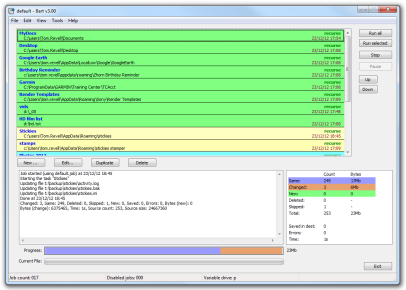
Bart is a file and folder backup tool, which transfers changes from multiple source directory trees to destination trees. When run, it will copy any files which have changed since the last run, bringing the destination up to date with the source in an efficient way, copying only files required.
Bart can read from a list of source directories, so not only can it keep your Documents folder backed up, but also any other data stored on your drive in other locations. Direct the target of each of these folders at a network drive on another machine, a second hard drive in the same machine, or removable media such as a USB pen drive. When first run, all the files will be copied, and then on subsequent runs only the files which have altered will be updated, new files copied, and deleted ones removed.
Bart keeps the target completely in line with the source. It does not perform two-way synchronisation. If a file in the target was changed, on next run of Bart, it would be replaced with the file from the source.
Source
The source can be either a single file, or a directory. If a directory is used, then a checkbox controls whether all subdirectories are also copied. Multiple source directories can be chosen, so that all your data areas can be backed up at once.
Destination
The destination folder is kept synchronised with the source. Any changes which are made to the destination would be overwritten the next time Bart is run - to this end do not edit files in the destination, or save anything new there! The synchronisation is one-way, and is complete.
|
Note:
The destination directory is changed to have the same file content as the source. If you set a directory or drive root which already contains any files, this means those will be deleted. Create a new empty directory and use that as the destination. |
Exclusions
An exclusion list can be set for each task, so that certain files can be ignored. To back up a photos
directory, but leave out thumbnail files, the pattern thumbs* would be added. Multiple file
specifications can be made, such as *obj;*pdb;*aps;*.sbr;*.pch;*.idb;*.res, and full paths
can be excluded by specifying them. d:\photos\2004;thumbs*;00_index*;*gif would omit the
2004 folder, and also skip over any file starting with thumbs or 00_index and
any ending with gif.
Exclude directories by specifying the whole directory, eg c:\program files\firewall.
Exclude files by specifying the filename, eg persfw.conf, not the whole path
c:\program files\firewall\persfw.conf
Command line
The following can be specified on the command line:
-runall- Bart will run all enabled jobs, show the balloon summary and quit -show - When used with -runall, the main dialog is displayed while the jobs are running-stay- Bart will stick around once it's finished running the jobs. Clicking any buttons in the interface if -show is specified will also cause it to remain-shutdown- the computer will be shut down once the jobs have been run, as long as there were no errors in any of the tasks-ignoreerrors- if -shutdown has been specified and errors were found, shut down anyway-datelog- save detailed logs to different files, named as the date on which the job was run-logexclusions- also write files which are skipped to the detailed log file-file <filename>- open the specified job file-noballoon- do not display a tray icon balloon when the job has completed-auto- run silently with no user interaction, or windows: use this for running Bart from a Scheduled Task-showdetlog- open the detailed log file when the job completes-letter:x- set 'x' as the variable drive. To use this letter in the "Destination directory" type a ? - e.g.?:\users
e.g. c:\program files\bart\bart.exe -runall -show -shutdown
Logging
Bart writes an HTML-based log file (log.html) of its operations, a CSV with details of each run
summary.log, and pops up a task-tray balloon when the tasks are complete.
AvviaBackup
Bart user Piero Pratesi has written a companion app (in Italian) named AvviaBackup which helps
locate a certain removable drive connected to your machine, and then launches Bart with the -letter
command line parameter filled in. To use it, create a folder named ZZZZZZZZZZ_NON_CAMBIARE_NOME on
the root of your drive, and then an empty file in that folder named ZZZZZZZZZZ_SEGNAPOSTO_BACKUP.TXT.
Put the exe in the same location as Bart, and then run:
AvviaBackup.exe -letter:
Pascal source code is also included in the download, which is below.
Versions
v3.1 - December 2019
New
- Added
-sleep - "No prefix" added to current file name CStatic, can maximise, selection hilight now blue, "very safe" mode
- "..." buttons in edit dialog
- Added "error to warning" option in jobs
Changes
- Disabled items also have a struck out font
- Full path listed when a file is deleted
- Much more debugging written to file when set, ProcessReparsePoint added
- Space toggle enabled
- High DPI support added
- App is now statically linked
Fixes
- DeleteFile now uses Unicode path, edited and duplicated tasks are scrolled into view
- Can no longer insert < or > into job names
- Exclusions are no longer _stat'd, bug with new exclusions not being deleted from destination
- Stop button disabled along with Pause
- DST and FAT handled in IsFileIdentical
- Jobs running > 24h no longer truncate their running time
v3.00 - 23rd December 2012
New
- Full Unicode support
- Progress bar
-showdetlogcommand line option- "Rename files in destination if just the case has changed" task option
- Added "Keep system awake" options
- "Clear log window" menu item
- App can be fully portable by using 'bart.ini' rather than the registry
- Status bar
- Double-click a log line to copy it to the clipboard
- Debug mode
- "Do not copy files with exactly one hour modification difference" option
Fixes
- Log file shows job run total seconds correctly
- Detail log now shown correctly with
-datelogparameter when clicking the tray balloon - Menu items are now interactive during task runs
- Bug right-clicking tasks further than 10th in the list fixed
New
- "Failed to open source" now reports why
- Added a third '0' to the job count
- Moved buttons to menus
- Added a Options dialog
- Dialog can be resized
- REPARSE_POINT and JUNCTION directory entries are now ignored
- Errors are shown in the summary box in red
Download Bart
Download AvviaBackup